고양이의 체력(Hp)를 UI로 연동시키기_UI 조작
UI를 컨트롤할 스크립트 생성 ( GameDirector )
- 빈 게임 오브젝트를 생성하여 이름 변경( GameDirector )

- GameDirector스크립트 생성후 GameDirector 게임오브젝트에 컴포넌트화

GmaeDirector 스크립트에서 UI조작하기
- Canvas의 UI사용시 반드시 using UnityEngine.UI 선언할 것!
using System.Collections;
using System.Collections.Generic;
using UnityEngine;
using UnityEngine.UI; // UI사용시 반드시 선언할것

public class GameDirector : MonoBehaviour
{
    [SerializeField] private Image HpGauge; // UI로 사용할 이미지 스크립트를 저장할 변수 선언
    // Start is called before the first frame update


    public void DecreaseHp() // Hp게이지를 감소시키는 함수
    {
        this.HpGauge.fillAmount -= 0.1f; // fillAmount를 -0.1 감소
    }
}
GameDirector 게임오브젝트에 UI 넣기
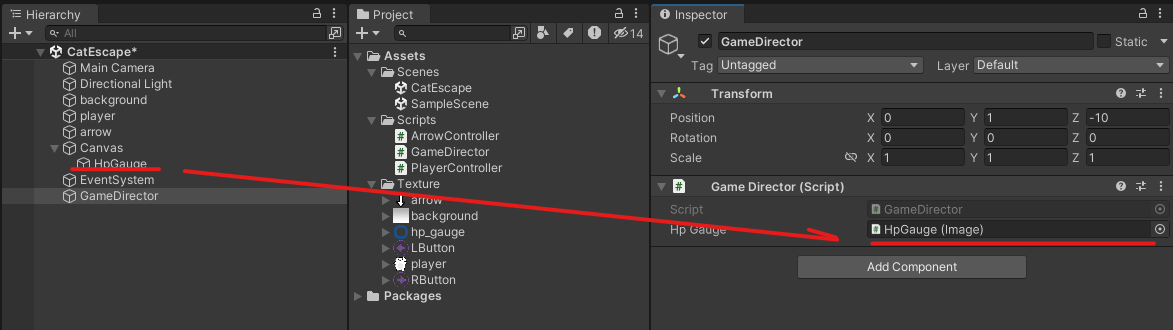
고양이와 화살이 충돌시 Hp게이지 감소시키기(ArrowController)
- 화살을 계속해서 생성되기때문에 이름으로 불러올수 없다. > 이름이 생성되고 없어지기를 반복한다.
- 따라서 속성으로 불러와야 한다.
public class ArrowController : MonoBehaviour
{
    [SerializeField] private float speed = 3; // 낙하속도
    private GameObject playerCat; // 고양이가 저장될 게임 오브젝트 변수 선언
    private GameDirector gameDirector; // Hp를 조작할 GameDirector가 저장될 변수 선언 >> 화살은 동적으로 생성되기 때문에 게임오브젝트로 불러올 수 없다.
    private float radius = 0.5f; // 화살의 반지름
    // Start is called before the first frame update
    void Start()
    {
        this.playerCat = GameObject.Find("player"); // 고양이의 오브젝트를 이름으로 찾아 변수에 저장
        this.gameDirector = GameObject.FindObjectOfType<GameDirector>(); // GameDirector오브젝트의 GameDirector스크립트 컴포넌트 저장
    }
- 충돌시 Hp게이지 감소(충돌판정 부분에 Hp게이지 감소 메서드 추가)
    private void TouchCat() // 고양이와 화살의 거리를 통한 충돌 판정구현
    {
        // 고양이와 화살의 거리 구하기
        Vector2 arrowPositon = this.transform.position; // 화살의 위치
        Vector2 catPosition = playerCat.transform.position; // 고양이의 위치
        Vector2 dir = arrowPositon - catPosition; // 방향 + 거리
        float distance = dir.magnitude; // 거리만 산출

        // 반지름 가져오기
        float arrowR = this.radius; // 화살의 반지름
        PlayerController playerController = this.playerCat.GetComponent<PlayerController>(); // 고양이의 스크립트 컴포넌트 가져오기
        float catR = playerController.radius; // 고양이의 반지름 >> private로 선언해 놓아 못가져오니 public으로 전환

        // 반지름 더하기
        float sumRdius = arrowR + catR;

        // 고양이와 충돌시 화살 삭제
        if(distance <= sumRdius)
        {
            this.gameDirector.DecreaseHp(); // Hp감소 메서드 실행
            Destroy(this.gameObject);
        }

    }
- 결과
'Learn_Unity > CatEscape' 카테고리의 다른 글
| CatEscape_4 (0) | 2024.01.30 |
|---|---|
| CatEscape_3 (0) | 2024.01.30 |
| CatEscape_2 (1) | 2024.01.30 |
| CatEscape_1 (1) | 2024.01.30 |
| CatEscape_R&D (1) | 2024.01.30 |


